EMPLOYEES
Maintaining accurate employee records is an important part of managing workplace health and safety, workforce competency, and compliance requirements.
The Employees section enables administrators to maintain employee details, manage training records, and ensure workers have the qualifications and competencies required to perform their duties safely.
Employees who use Onsite can have their training and competency records readily available when working on construction projects, attending site inductions, or undergoing compliance audits.
Employee Register
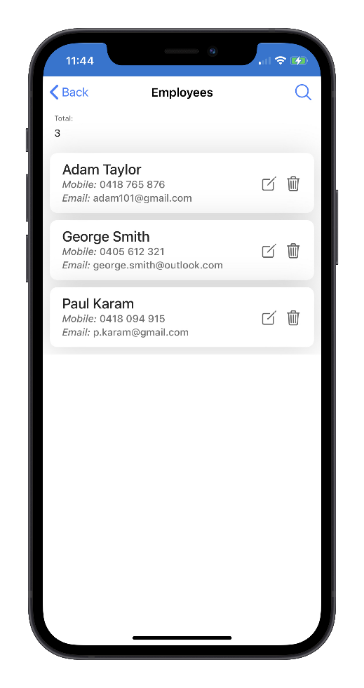
The Employee Register provides a list of all employees connected to your organisation.
From the register, administrators can:
- View employee details
- Update employee information
- Access employee training records
- Add new training records
- Remove inactive employees from the register
Selecting an employee opens their profile, where training and competency records can be viewed and managed.
Training Register
The Training Register records employee qualifications, licences, certifications, and training activities.
Examples of training records include:
- Construction Induction (White Card)
- Trade Qualifications
- High Risk Work Licences
- First Aid Certificates
- Plant Operator Competencies
- Company Training Programs
-
Safety and Compliance Training
Maintaining current training records helps ensure that workers remain qualified for site access and assigned work activities.
Training records can be viewed on site when requested by clients, supervisors, auditors, or regulatory authorities.
Add Employee
The Add Employee function is used to register employees who may require access to Onsite and company-managed construction projects.
When an employee is added:
- An employee profile is created
- Training and competency records can be maintained
- The employee can be assigned to projects as required
- Training records become accessible through Onsite when working on site
This function is typically used for direct employees of the company.
When to Use This Function
Use Add Employee when:
- A new employee joins the organisation
- Existing employee records need to be created in Onsite
- Training and competency records need to be maintained centrally
Connect Employee
Workers who first register themselves through Onsite when arriving at a construction site are initially recognised as workers associated with their company but may not yet be connected to the company's Employee Register.
The Connect Employee function allows an Administrator to link an existing worker account to the organisation's employee records.
This is particularly useful when:
- A worker has self-registered through a site induction
- The worker later becomes a direct employee
- Training records need to be managed through the Employee Register
- The organisation wants to maintain a complete employee profile for the worker
How It Works
1. The Administrator selects Connect Employee.
2. The worker is located using their email address.
3. The worker's existing Onsite account is linked to the company's Employee Register.
4. Training, competency, and employment records can then be managed from a single employee profile.
Employee Management Best Practice
To maintain accurate workforce records, administrators should:
- Add new employees as part of the onboarding process.
- Keep employee contact details current.
- Record qualifications, licences, and training as they are completed.
- Monitor expiry dates for licences and certifications.
- Connect self-registered workers to the Employee Register where appropriate.
- Remove or deactivate employees who no longer work for the organisation.
Maintaining complete and up-to-date employee records helps ensure workers can be verified quickly, training requirements are monitored effectively, and compliance obligations can be demonstrated when required.