SINGLE RESIDENTIAL PROJECTS
Managing Safety on Single Residential Projects
On single residential construction projects, builders are not always present on site and therefore rely heavily on subcontractors to manage the risks associated with their own work and the workers they engage.
The Construction Work Code of Practice recognises this approach, provided the builder has an effective system for monitoring compliance and verifying that appropriate controls are in place.
Onsite provides this system by helping builders:
- Verify contractor compliance before work begins
- Review and approve Safe Work Method Statements (SWMS)
- Induct workers online
- Monitor site attendance
- Conduct inspections
- Manage non-compliance and corrective actions
- Maintain a complete digital record of safety activities
Safe Work Method Statements (SWMS)
Safe Work Method Statements (SWMS) are a primary risk control for high-risk construction work.
Subcontractors are required to provide SWMS that:
- Identify hazards associated with the work
- Describe the control measures to be implemented
- Outline the safe work procedures to be followed
- Have been developed in consultation with affected workers
For single residential projects, subcontractors will typically submit a generic SWMS that can be applied across multiple residential building sites.
Managing SWMS and Worker Inductions
Onsite helps builders ensure that workers understand and comply with their contractor's approved SWMS.
Step 1: Select the Contractor
The Select Contractor function identifies subcontractors engaged on the project and determines whether a SWMS is required.
Step 2: Request a SWMS
The Send SWMS Request function emails the contractor a link to an online form where they can:
- Complete required compliance checks
- Upload their SWMS
- Submit the SWMS for review
Step 3: Review and Approve
Builders or supervisors review the submitted SWMS and either:
- Approve the SWMS, or
- Request amendments before approval
Step 4: Induct Workers
Once the SWMS has been approved, the contractor can:
- Maintain a register of employees
- Invite workers to complete an online induction
- Ensure workers review and acknowledge the approved SWMS before commencing work
Monitoring Compliance
The effectiveness of subcontractor safety management must be monitored throughout the project.
Onsite supports this process by:
Requiring Site Sign-In
All workers and visitors must:
- Register with Onsite
- Complete any required inductions
- Sign in before entering the site
The system automatically verifies that induction requirements have been completed before attendance is recorded.
Conducting Site Inspections
Supervisors should conduct regular site inspections to confirm that:
- Workers have completed inductions
- Approved SWMS are being followed
- Safety controls remain effective
Where issues are identified, corrective actions can be issued directly through Onsite.
Managing Non-Compliance
If a worker or contractor fails to meet project safety requirements, a Non-Compliance Notice can be issued and tracked until the issue has been resolved.
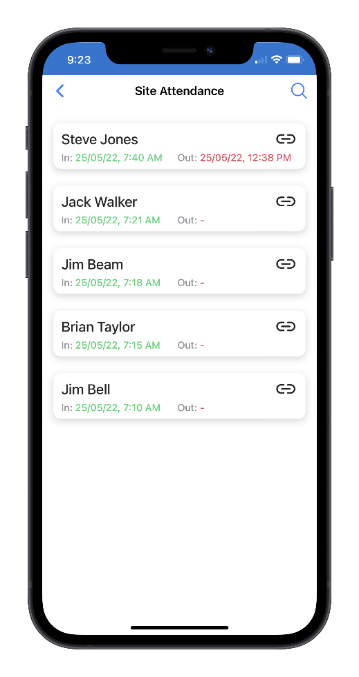
Site Attendance
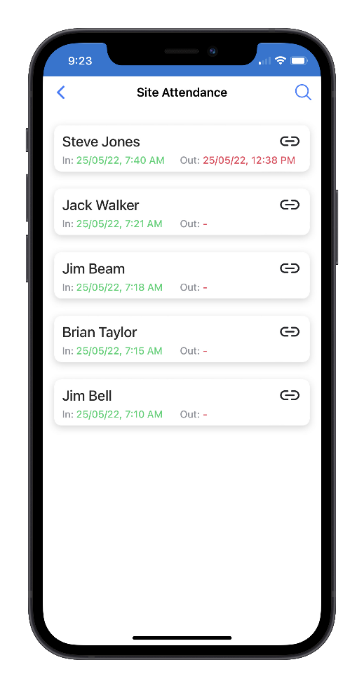
The Site Attendance function provides a complete record of workers and visitors who have attended the project.
Attendance records include:
- Sign-in and sign-out times
- Worker and contractor details
- Safety checklist responses
- Training and induction records
Records are displayed in chronological order, with the most recent attendance displayed first.
The Search function can be used to locate records by worker name or attendance date.
Toolbox Talks
The Toolbox Talks function is used to record safety meetings and communicate important site information.
Before a toolbox talk begins, workers should record their attendance using the Toolbox Talk Sign In function and either:
- Scan the toolbox talk QR code, or
- Use GPS location verification
Attendance records are automatically linked to the meeting and project.
Site Inspections
The Site Inspection function enables supervisors to perform inspections using a mobile-friendly form.
Inspection forms can be customised to record:
- Inspection results
- Notes and observations
- Photographs
- Video evidence
Each inspection is automatically linked to:
- The user who completed the inspection
- The project where the inspection occurred
Inspections requiring follow-up actions are recorded with an Open status until completed.
Non-Compliance Notices
A Non-Compliance Notice is used to notify a contractor or worker that project safety requirements have not been met.
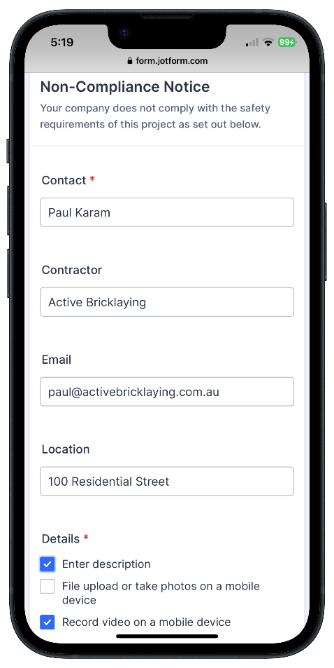
The form can record:
- Details of the non-compliance
- Photographs
- Videos
- Required corrective actions
The notice is automatically linked to the relevant project and user who issued it.
When a notice is issued, Onsite generates and tracks any associated Corrective Action Requests until the issue is closed.
Defect Notices
The Defect Notice function is used to record construction defects requiring rectification.
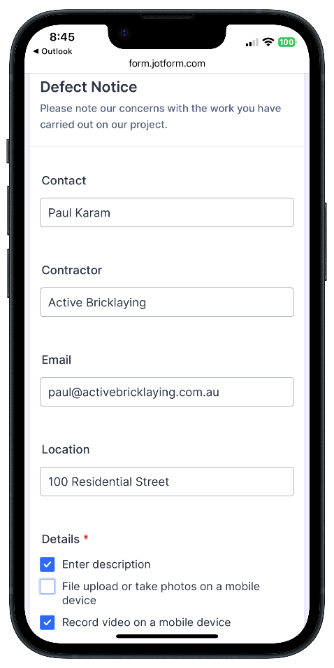
Defect notices can include:
- Detailed descriptions
- Photographs
- Videos
- Required corrective actions
- Due dates for rectification
Like Non-Compliance Notices, Defect Notices are managed through to completion and remain Open until all corrective actions have been closed.
Project Administration
The following functions are available to users with the Administrator role.
Action List
The Action List helps supervisors identify project records requiring attention.
Using configurable criteria, the Action Agent can generate a list of outstanding items, including:
- Open corrective actions
- Unreviewed records
- Outstanding compliance matters
The results can be exported to Excel and include direct links to the originating records.
Site Message
The Site Message function allows supervisors to:
- Maintain the site's Message of the Day
- Display important notices during sign-in
- Send email messages to workers
- Send SMS alerts to workers currently signed in on site
Common uses include weather alerts, delivery schedules, site hazards, and emergency notifications.
Download QR Code
The Download QR Code function downloads the project's unique QR code as a PNG image.
The QR code is typically displayed:
- At site entrances
- On sign-in stations
- On toolbox talk signage
Workers use the QR code to access the project and record attendance.
Project Documents
The Project Documents function allows supervisors to upload and maintain project-specific documentation, including:
- WHS Management Plans
- Emergency Procedures
- Site Rules
- Project Instructions
- Safety Bulletins
Documents can be viewed by workers who are currently signed in to the project.
Edit Project
The Edit Project function allows administrators to update project details, including project information, settings, and configuration options.
Export Records
Project records can be exported to Excel for reporting, auditing, or archiving purposes.
Available exports include:
- Inductions
- SWMS
- Toolbox Talks
- Site Inspections
Toolbox Talk Topics
The Toolbox Talk Topics function maintains the library of topics available when creating toolbox talk records.
This helps ensure consistent safety messaging across projects.
Deactivate Project
When a project is complete, the Deactivate Project function can be used to remove it from active project lists while preserving all project records for future reference and audit purposes.